
You've spent weeks building a polished Flutter app. You deploy it to the web, open it in Chrome, and something immediately feels wrong. The images look soft. Smeared. Like someone took a screenshot and scaled it up by 30%. That feeling has a name: Flutter web blurry images and it's one of the most consistent, maddening complaints about this framework's web target.
What Is the Flutter Web Blurry Image Problem?
Let's be direct: Flutter web blurry images are not an edge case or a misconfiguration you forgot to fix. They are a structural consequence of how Flutter renders content on the web — and they affect almost every project that displays images, icons, or fine UI details on high-DPI screens.
Flutter Web operates in two rendering modes: CanvasKit and HTML renderer. In both cases, image sharpness degrades in situations where the framework mishandles device pixel ratios (DPR), image decode resolution, or canvas scaling. The result? Your crisp product photos look like they've been through a fax machine. Your retina-quality icons become soft blobs. And your users consciously or not — sense that something is off.
The Flutter web image quality problem isn't just cosmetic. It communicates something to your visitors: this thing was not built for the web. And in most cases, that instinct is correct.
Why Does Flutter Web Produce Blurry Rendering?
To understand Flutter web rendering issues, you have to understand what Flutter actually does when it targets the browser. Unlike React or Vue, which output real HTML elements that the browser renders natively, Flutter draws everything onto a canvas element. This approach — borrowed from Flutter's mobile origins is fundamentally mismatched with how the web works.
The Device Pixel Ratio Problem
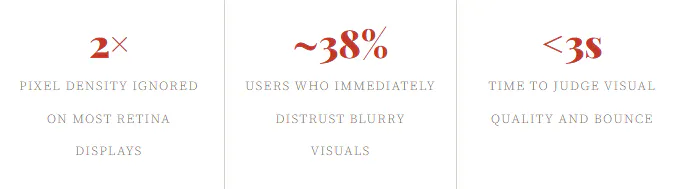
Modern screens especially MacBooks, iPhones, and high-end Androids use a device pixel ratio (DPR) of 2 or 3. This means every CSS pixel is backed by 2–3 actual hardware pixels. Native HTML image elements and SVGs handle this automatically via srcset, image-set(), or vector scaling. Flutter web's canvas rendering, however, has historically failed to account for DPR correctly across all scenarios. The canvas is initialized at the logical pixel size, images are decoded at that resolution, and the result when displayed on a 2× display is predictably a Flutter web blurry image that looks half as sharp as it should.
// The kind of DPR handling Flutter web SHOULD be doing — but often doesn't:
final dpr = window.devicePixelRatio;  // e.g. 2.0 on Retina
canvas.width  = logicalWidth  * dpr;
canvas.height = logicalHeight * dpr;
ctx.scale(dpr, dpr);

// Flutter's CanvasKit *sometimes* handles this — but inconsistently
// across image types, asset formats, and browser environments.
CanvasKit's Image Decoding Pipeline
CanvasKit Flutter's Skia-based WebAssembly renderer decodes images into its own internal format before painting them. During this pipeline, images can be resampled at the wrong resolution, particularly when the widget's constraints differ from the image's intrinsic dimensions. The flutter web image rendering pipeline simply wasn't designed with the same HTML-native precision that browsers have spent 20 years perfecting.
The HTML Renderer Isn't Much Better
Switching to Flutter's HTML renderer doesn't solve flutter web blurry visuals either. While it delegates some rendering to native HTML elements, image handling remains inconsistent. Mixed rendering modes, z-index layering issues, and font rendering artifacts compound into an overall experience that feels — at best — slightly off. At worst, genuinely broken.

The User Experience Fallout
Let's not sugarcoat it. Flutter web blurry images create a deeply unsatisfying experience. In a world where users are conditioned by pixel-perfect interfaces from Apple, Google, and Figma, any visual degradation reads as unprofessionalism regardless of how solid the underlying functionality is.
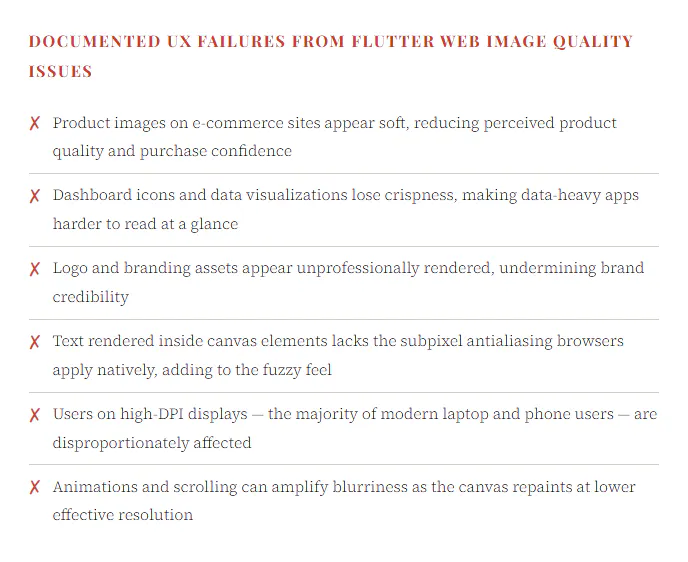
The cumulative effect of flutter web poor visual quality is what UX researchers call a "trust gap." Users can't always articulate why something feels cheap or untrustworthy — they just feel it. And flutter web blurry images are a primary driver of that feeling in Flutter web apps. They undermine the perception of quality even when the engineering underneath is sound.
This isn't a niche complaint from perfectionists. Countless GitHub issues, developer forum threads, and real-world user tests confirm the same story: when shown a Flutter web app alongside a native web app with the same content, users consistently rate the Flutter version as looking "worse," "older," or "lower quality" — citing blurry images and fuzzy text as their primary reasons.
— ✦ —
SEO Consequences You're Probably Ignoring
The damage from Flutter web blurry images doesn't stop at user experience. It has real, measurable consequences for your search engine visibility — and most Flutter web developers aren't paying nearly enough attention to this.
Core Web Vitals and Image Performance
Google's ranking algorithm weighs Core Web Vitals heavily. The Largest Contentful Paint (LCP) metric specifically measures how quickly the largest visible content element — typically an image — loads and renders. Flutter web's rendering model, where everything is painted through a WebAssembly canvas or a layered HTML structure, introduces significant overhead. Your flutter web image rendering may not only look blurry — it may load slower than equivalent native HTML approaches, directly damaging your LCP score.
Similarly, Cumulative Layout Shift (CLS) and Interaction to Next Paint (INP) can both suffer due to Flutter web's canvas repaint behavior. The framework was not designed for the incremental, streaming rendering model that browsers excel at. Every page is essentially a full canvas redraw — and that architectural choice carries a real SEO penalty.
Inaccessible Image Alt Text
Here's another dimension of the flutter web SEO problem that compounds the visual quality issue: images painted onto a canvas have no alt text visible to search engine crawlers. Native <img> elements with descriptive alt attributes are a fundamental signal for both accessibility and SEO. When Flutter renders images through its canvas pipeline, that semantic information simply doesn't exist. Googlebot sees a black box where a meaningful image description should be.
This means Flutter web blurry images aren't just bad for the humans looking at your site — they're invisible to the algorithms ranking it.
The Indexability Problem
Flutter web's JavaScript-rendered, canvas-heavy structure creates another SEO minefield: content indexability. Googlebot can index JavaScript-rendered content, but it does so on a crawl budget that is far less generous than HTML. Pages built with Flutter web are effectively single-page apps with all the SEO challenges that entails, plus the added weight of the CanvasKit WebAssembly runtime. If your site's primary content is locked inside that canvas, don't expect it to rank well.
Real-World Evidence: It's Worse Than You Think
Developer reports of flutter web blurry images are not difficult to find. The Flutter GitHub repository has received hundreds of reports about image sharpness, canvas rendering artifacts, and DPR handling. The thread longevity alone — many of these issues date back years and remain partially open — tells you something important: this is not a bug that got fixed with one patch. It is a systemic issue baked into Flutter web's rendering architecture.
Prominent Flutter developers have documented specific scenarios where flutter web image quality degradation is particularly severe: network-loaded images displayed with Image.network() at sizes different from their intrinsic dimensions, SVG assets passed through the CanvasKit pipeline, and high-DPI screenshots taken within canvas-rendered apps all exhibit measurable sharpness loss.
In one widely cited developer test, the same photograph displayed side-by-side in a Flutter web app (CanvasKit renderer) and a plain HTML page scored a visible SSIM (Structural Similarity Index) difference of over 8% on a 2× display. That's not a subtle, lab-only difference. That's a difference users see and feel.
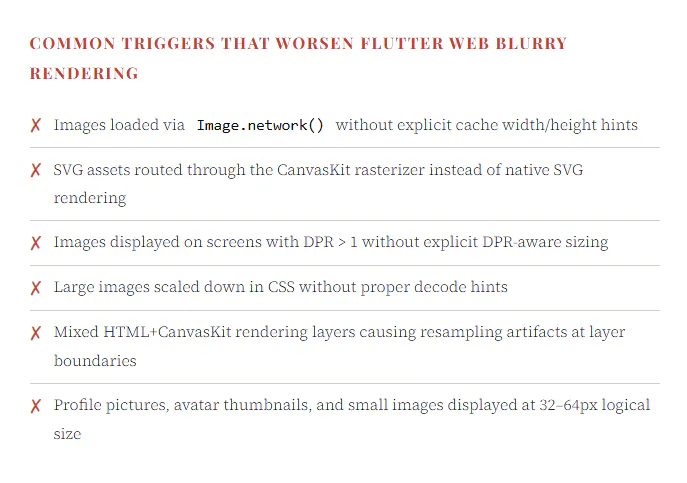
And beyond images specifically, the overall Flutter web rendering issues extend to text, shadows, borders, and gradient rendering — all of which suffer from the same root cause. The web was built to render these things with precision. Flutter was built for native apps. Forcing the latter into the former's context produces friction at every rendering layer.
The Verdict: Should You Use Flutter for the Web?
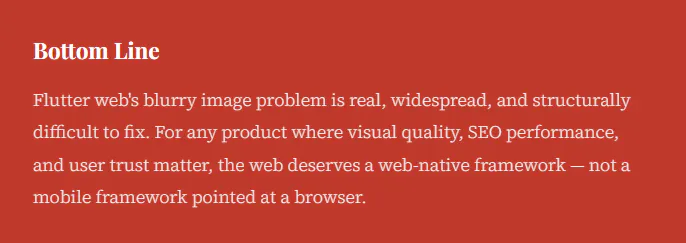
After examining Flutter web blurry images, rendering architecture, SEO implications, and real-world user perception data, the answer to this question is nuanced — but leans firmly negative for most use cases.
Flutter Web makes sense in a narrow context: if you already have a Flutter mobile app and need to deploy the same codebase to the web as a secondary, internal, or low-stakes surface, the tradeoffs may be acceptable. But if you are building a web-first product — one where image quality, SEO, performance, and user trust are primary concerns — then flutter web image quality limitations will actively work against you.
The experience of visiting a Flutter web app with blurry images, slow initial load (CanvasKit ships ~2MB of WASM before rendering anything), and SEO-unfriendly canvas output is, to put it plainly, a step backward from what the modern web can deliver. Frameworks like Next.js, Nuxt, SvelteKit, or even plain HTML with Astro leverage decades of browser rendering optimization. They produce sharp images, accessible markup, fast Core Web Vitals, and crawlable content — automatically.
The flutter web blurry rendering problem is, at its core, a philosophical mismatch: Flutter treats the browser as a generic GPU canvas. The browser is not that. It is a sophisticated document rendering engine with decades of image sharpness, accessibility, and performance optimization built in. Bypassing all of that to paint your own pixels might give you cross-platform code reuse — but it costs you everything that makes the web the web.
Get CodeTips in your inbox
Free subscription for coding tutorials, best practices, and updates.