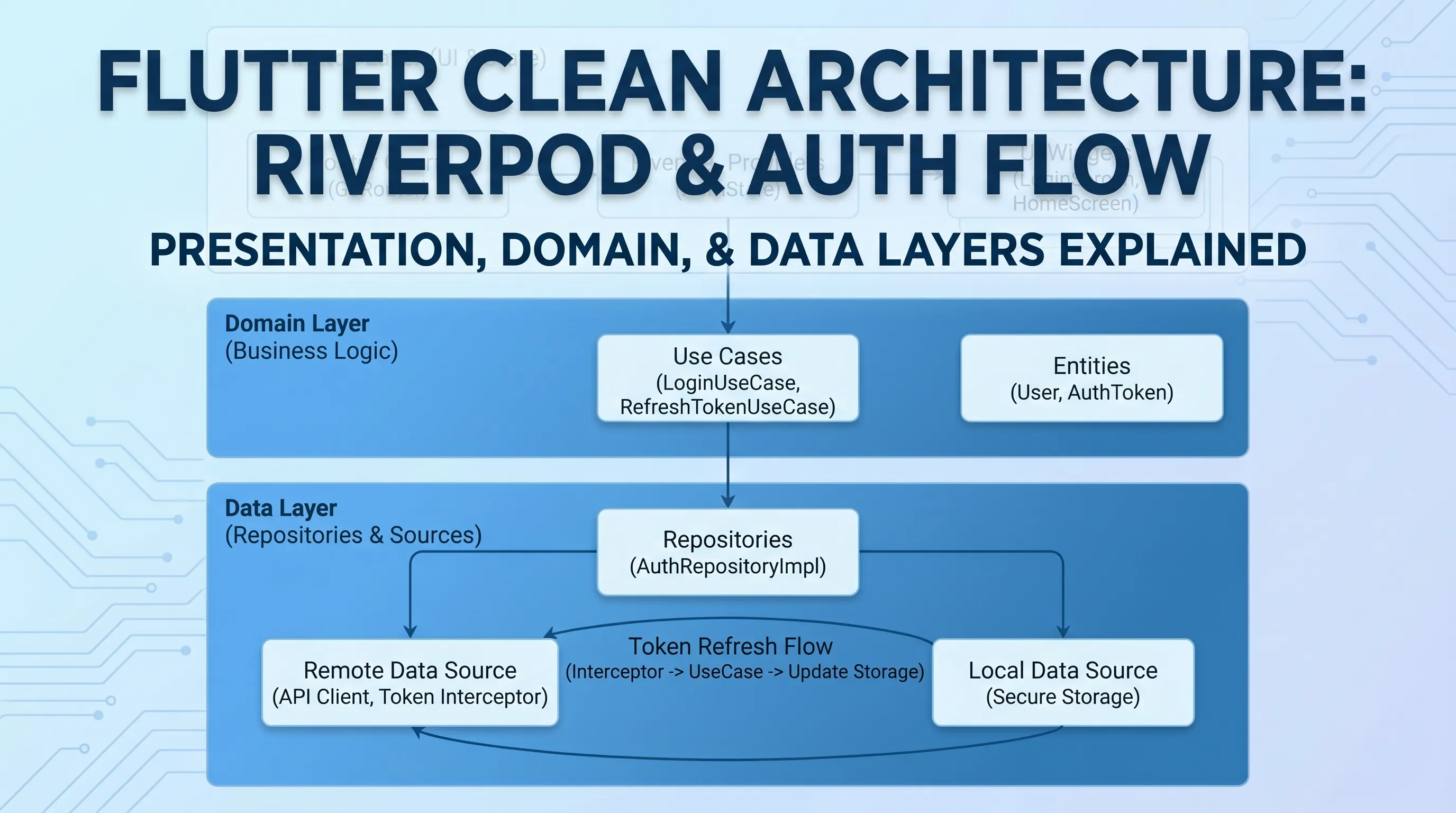
Building a Bulletproof Auth System with Flutter, Riverpod, GoRouter, and Clean Architecture

Authentication is one of those features that looks simple on the surface but hides a dozen subtle bugs waiting to bite you in production. In this post, I'll walk through the auth system I built for Bookify Pro — a professional Flutter SaaS app — and explain every architectural decision, including one small class that, if removed, would silently break the entire routing system.
The Stack
- Flutter 3.41 + Dart 3.11
- Riverpod (code-gen) — state management
- GoRouter — declarative routing with redirect guards
- Clean Architecture — domain / data / presentation layers
- Dio + Retrofit — networking with interceptors
- SharedPreferences — local token persistence
Architecture Overview
The auth feature follows strict Clean Architecture layering:
features/auth/
├── domain/
│   ├── entities/        # User, AuthTokens, PhoneNumber
│   ├── repositories/    # AuthRepository (abstract), UserSessionRepository (abstract)
│   └── usecases/        # LoginUseCase, RegisterUseCase
├── data/
│   ├── datasources/
│   │   ├── remote/      # AuthApiService (Retrofit)
│   │   └── local/       # AuthLocalService (SharedPreferences)
│   ├── models/          # AuthUserModel (DTO + toEntity())
│   └── repositories/    # AuthRepositoryImpl, UserSessionRepositoryImpl
└── presentation/
    ├── providers/        # LoginNotifier, RegisterNotifier
    └── screens/         # LoginScreen, RegisterScreen, etc.
The UI never touches raw API data. Everything flows through domain entities, and errors are typed Failure objects — never raw DioException.
The Domain Layer
The User Entity
class User extends Equatable {
  final String uid;
  final String fullName;
  final String email;
  final PhoneNumber phone;
  final Role role;
  final String? avatarUrl;
  final DateTime registeredAt;
  final bool isEmailVerified;
  final bool hasCompletedProfile; // drives onboarding redirect
  final Organization? organization;
  final AuthTokens tokens;

  // ...
}

class AuthTokens extends Equatable {
  final String accessToken;
  final String refreshToken;
}
hasCompletedProfile is what powers the onboarding guard in the router — more on that shortly.
Repository Contracts
abstract class AuthRepository {
  Future<DataState<User>> login({required String email, required String password});
  Future<DataState<User>> register({...});
  Future<DataState<User>> refreshToken({required String refreshToken});
}

abstract class UserSessionRepository {
  Future<DataState<User>> getUser();
  Future<DataState<Unit>> saveUser(User user);
  Future<DataState<Unit>> clearUser();
}
The DataState<T> pattern wraps all results in a success/failure union — no exceptions leaking into the presentation layer.
The Data Layer
Token Storage
Tokens are persisted in SharedPreferences through AuthLocalService:
const String userKey = "auth_user";

class AuthLocalService {
  Future<void> saveUser(AuthUserModel user) async {
    final preferences = await SharedPreferences.getInstance();
    await preferences.setString(userKey, jsonEncode(user.toJson()));
  }

  Future<AuthUserModel?> getUser() async {
    final preferences = await SharedPreferences.getInstance();
    final userData = preferences.getString(userKey);
    if (userData != null) {
      return AuthUserModel.fromJson(jsonDecode(userData));
    }
    return null;
  }

  Future<void> clearUser() async {
    final preferences = await SharedPreferences.getInstance();
    await preferences.remove(userKey);
  }
}
The Dio Interceptor — Auto Token Injection & 401 Handling
The interceptor automatically injects the access token on every request and emits an event when the server returns 401:
class _AuthInterceptor extends Interceptor {
  final AuthLocalService authLocalService;

  _AuthInterceptor(this.authLocalService);

  @override
  void onRequest(RequestOptions options, RequestInterceptorHandler handler) async {
    // Skip auth header for the refresh endpoint itself
    if (options.path.contains('/v1/auth/refresh')) {
      handler.next(options);
      return;
    }

    final user = await authLocalService.getUser();
    if (user?.meta.token != null) {
      options.headers['Authorization'] = 'Bearer ${user!.meta.token}';
    }

    handler.next(options);
  }

  @override
  void onError(DioException err, ErrorInterceptorHandler handler) async {
    if (err.response?.statusCode == 401) {
      AuthEvents.emit(TokenExpiredEvent()); // fire-and-forget event
    }
    handler.next(err);
  }
}
Notice that the refresh endpoint is skipped — otherwise you'd get infinite refresh loops on a failed refresh.
The Event Bus — Decoupling the Interceptor from the UI
The Dio interceptor lives deep in the network layer. It can't directly call Riverpod or navigate. That's where AuthEvents comes in:
class AuthEvents {
  static final StreamController<AuthEvent> _controller =
      StreamController<AuthEvent>.broadcast();

  static Stream<AuthEvent> get stream => _controller.stream;

  static void emit(AuthEvent event) {
    _controller.add(event);
  }
}

abstract class AuthEvent {}

class TokenExpiredEvent extends AuthEvent {}
class AuthenticatedEvent extends AuthEvent {
  final User user;
  AuthenticatedEvent(this.user);
}
class UpdateProfileEvent extends AuthEvent {
  final User user;
  UpdateProfileEvent(this.user);
}
class LogOutEvent extends AuthEvent {}
A broadcast StreamController lets any part of the app emit events without knowing who's listening. The AuthGuard widget is the sole listener that translates these events into navigation and state mutations.
The Core Auth Provider
AuthNotifier is the source of truth for authentication state across the entire app:
@riverpod
class AuthNotifier extends _$AuthNotifier {
  @override
  AsyncValue<User?> build() {
    _checkAuthStatus();
    return const AsyncValue.loading();
  }

  Future<void> _checkAuthStatus() async {
    try {
      final userSessionRepository = ref.read(userSessionRepositoryProvider);
      final result = await userSessionRepository.getUser();

      result.when(
        success: (user) {
          if (!ref.mounted) return;
          state = AsyncValue.data(user);
          refreshExpiredToken(); // refresh token on cold start
        },
        failure: (_) {
          if (!ref.mounted) return;
          state = const AsyncValue.data(null);
        },
      );
    } catch (e) {
      if (!ref.mounted) return;
      state = const AsyncValue.data(null);
    }
  }

  void refreshExpiredToken({
    Function? onSuccess,
    Function(Failure error)? onError,
  }) async {
    final currentUser = state.value;
    if (currentUser != null) {
      final userRepository = ref.read(authRepositoryProvider);
      final tokensData = await userRepository.refreshToken(
        refreshToken: currentUser.tokens.refreshToken,
      );
      tokensData.when(
        success: (updatedUser) async {
          final userSessionRepository = ref.read(userSessionRepositoryProvider);
          await userSessionRepository.saveUser(updatedUser);
          setUser(updatedUser); // updates state with new tokens
          onSuccess?.call();
        },
        failure: (error) {
          logger.e('Failed to refresh token', error: error);
          onError?.call(error);
        },
      );
    }
  }

  Future<void> login(User user) async {
    state = AsyncValue.data(user);
    final userSessionRepository = ref.read(userSessionRepositoryProvider);
    await userSessionRepository.saveUser(user); // await last one
  }

  void updateCurrentUser(User user) {
    final userSessionRepository = ref.read(userSessionRepositoryProvider);
    userSessionRepository.saveUser(user);
    state = AsyncValue.data(user);
  }

  Future<void> logout() async {
    try {
      final userSessionRepository = ref.read(userSessionRepositoryProvider);
      await userSessionRepository.clearUser();
      if (!ref.mounted) return;
      state = const AsyncValue.data(null);
    } catch (e) {
      if (!ref.mounted) return;
      state = const AsyncValue.data(null);
    }
  }

  void setUser(User user) {
    state = AsyncValue.data(user);
  }
}
On app cold start: loads the persisted user, sets state, then immediately refreshes the token in the background. No redirect, no interruption.
The Auth Guard Widget
AuthGuard wraps the entire app shell and translates stream events into state:
class _AuthGuardState extends ConsumerState<AuthGuard> {
  late StreamSubscription<AuthEvent> _authSubscription;

  @override
  void initState() {
    super.initState();
    _authSubscription = AuthEvents.stream.listen(_handleAuthEvent);
  }

  void _handleAuthEvent(AuthEvent event) {
    if (!mounted) return;
    _performNavigation(event);
  }

  void _performNavigation(AuthEvent event) {
    final authNotifier = ref.read(authProvider.notifier);

    if (event is TokenExpiredEvent) {
      authNotifier.refreshExpiredToken(
        onError: (error) {
          authNotifier.logout();
        },
      );
    } else if (event is AuthenticatedEvent) {
      authNotifier.login(event.user);
    } else if (event is UpdateProfileEvent) {
      authNotifier.updateCurrentUser(event.user);
    } else if (event is LogOutEvent) {
      authNotifier.logout();
    }
  }

  @override
  void dispose() {
    _authSubscription.cancel();
    super.dispose();
  }

  @override
  Widget build(BuildContext context) => widget.child;
}
The Router — Where It All Comes Together
static GoRouter createRouter(WidgetRef ref) {
  return GoRouter(
    initialLocation: Routes.splash.path,
    navigatorKey: _navigatorKey,
    refreshListenable: AuthChangeNotifier(ref), // ← critical
    redirect: (context, state) {
      final authState = ref.read(authProvider);
      final currentLocation = state.matchedLocation;

      if (authState.isLoading) return Routes.splash.route;

      if (authState.hasValue) {
        final isAuthenticated = authState.value != null;
        final isPublicRoute = _isPublicRoutes(currentLocation);

        if (!isAuthenticated && !isPublicRoute) {
          return ResponsiveLayout.isDesktop(context)
              ? Routes.login.route
              : Routes.welcome.route;
        }

        if (isAuthenticated && !isPublicRoute) {
          if (!authState.value!.hasCompletedProfile) {
            return Routes.registerAdditionalInfo.route;
          }
          return null;
        }

        if (isAuthenticated && isPublicRoute) {
          if (!authState.value!.hasCompletedProfile) {
            return Routes.registerAdditionalInfo.route;
          }
          return Routes.calendar.route;
        }
      }

      if (authState.hasError) return Routes.welcome.route;
      return null;
    },
    routes: [
      ShellRoute(
        builder: (context, state, child) => AuthGuard(child: child),
        routes: [ /* ... */ ],
      ),
    ],
  );
}
The redirect logic handles four scenarios:
- Loading → show splash
- Unauthenticated + protected route → redirect to login/welcome
- Authenticated + protected route → check onboarding, then allow
- Authenticated + public route → redirect to the main app
The Most Important Class in the Router
Now we get to the star of the show — a tiny class that looks trivial but is absolutely load-bearing:
class AuthChangeNotifier extends ChangeNotifier {
  final WidgetRef ref;

  AuthChangeNotifier(this.ref) {
    ref.listen(authProvider, (_, _) {
      notifyListeners();
    });
  }
}
This is passed to GoRouter's refreshListenable parameter. Whenever the authProvider state changes, notifyListeners() is called, which tells GoRouter to re-evaluate its redirect function.
Why This Exists — And Why You Can't Just Use ref.watch
This is the key insight that most tutorials miss.
Inside createRouter, the redirect callback uses:
final authState = ref.read(authProvider); // ← read, not watch
Why read and not watch?
Because createRouter is called inside a widget's build method (or from a provider), and using ref.watch inside the router's redirect would mean the entire router rebuilds every time auth state changes — including token refreshes, profile updates, and any minor state mutation.
Here's what would happen if you used ref.watch:
// ❌ WRONG — causes redirect loops
redirect: (context, state) {
  final authState = ref.watch(authProvider); // watching inside redirect
  // ...
}
Each time authNotifier.setUser(updatedUser) runs after a successful token refresh, ref.watch triggers again. This causes GoRouter to rebuild and reinitialize, sending the user back to the initialLocation. As a result, someone in the middle of a task can suddenly be redirected to the splash screen or the calendar root — a disruptive and frustrating user experience.
With ref.read + AuthChangeNotifier, the flow is:
- authProvider state changes (token refreshed, user updated, etc.)
- ref.listen in AuthChangeNotifier fires
- notifyListeners() is called
- GoRouter's refreshListenable detects the notification
- GoRouter re-runs redirect only
- ref.read gets the current state snapshot
- Redirect logic evaluates — if the user is still authenticated and on a valid route, returns null (no redirect)
The difference: ref.watch rebuilds reactively and uncontrollably. ref.read + refreshListenable gives you controlled, intentional re-evaluation of the redirect.
The Broken Version
Without AuthChangeNotifier, you have two bad choices:
Option A: Use ref.watch — routerebuild
// Every token refresh teleports the user to initialLocation
final authState = ref.watch(authProvider);
Option B: Use ref.read with no refreshListenable — routes never update
// Router is completely static — logout doesn't redirect, login doesn't redirect
refreshListenable: null,
final authState = ref.read(authProvider);
AuthChangeNotifier is the bridge: it makes ref.read reactive without the side effects of ref.watch.
The Login Flow — End to End
Here's the complete flow from button tap to the calendar screen:
User taps "Login"
  ↓
LoginNotifier.login(email, password)
  ↓
LoginUseCase → AuthRepositoryImpl.login()
  ↓
AuthApiService.login() → POST /v1/auth/login
  ↓
AuthUserModel.toEntity() → User
  ↓
AuthEvents.emit(AuthenticatedEvent(user))
  ↓
AuthGuard._handleAuthEvent()
  ↓
authNotifier.login(user) → saves to SharedPreferences, sets state
  ↓
AuthChangeNotifier.notifyListeners()
  ↓
GoRouter re-runs redirect
  ↓
isAuthenticated = true, isPublicRoute = true → Routes.calendar.route
  ↓ (but we already called context.go(Routes.calendar.route) in AuthGuard)
User is on the calendar screen ✓
This avoids conflict because redirect does not override the navigation — it only enforces consistency. If the navigation target is already correct, it simply lets it pass.
The Token Refresh Flow — Invisible to the User
User makes API request
  ↓
_AuthInterceptor.onRequest() injects Bearer token
  ↓
Server returns 401 (token expired)
  ↓
_AuthInterceptor.onError() → AuthEvents.emit(TokenExpiredEvent())
  ↓
AuthGuard._handleAuthEvent()
  ↓
authNotifier.refreshExpiredToken()
  ↓
AuthRepositoryImpl.refreshToken() → POST /v1/auth/refresh
  ↓
authNotifier.setUser(updatedUser) → saves new tokens, updates state
  ↓
AuthChangeNotifier.notifyListeners()
  ↓
GoRouter re-runs redirect
  ↓
isAuthenticated = true, isPublicRoute = false → return null (no redirect!) ✓
  ↓
User never notices anything happened
This is the payoff of ref.read. The state updated, GoRouter re-evaluated, found everything valid, and returned null — the user stays exactly where they are.
If we had used ref.watch, step "GoRouter re-runs redirect" would have triggered a rebuild mid-token-refresh, and the user would have been bounced around.
The Onboarding Guard
New users who haven't completed their business profile are caught at the router level:
if (isAuthenticated && !isPublicRoute) {
  if (!authState.value!.hasCompletedProfile) {
    return Routes.registerAdditionalInfo.route; // forced redirect
  }
  return null;
}

if (isAuthenticated && isPublicRoute) {
  if (!authState.value!.hasCompletedProfile) {
    return Routes.registerAdditionalInfo.route; // can't skip by going to login
  }
  return Routes.calendar.route;
}
The check exists in both branches — authenticated + protected routes AND authenticated + public routes. A user can't escape onboarding by manually navigating to /login or /welcome.
Once they complete their profile, the backend returns a user with hasCompletedProfile: true. AuthEvents.emit(UpdateProfileEvent(user)) fires, authNotifier.updateCurrentUser(user) runs, the router re-evaluates, and the onboarding check passes — they proceed normally.
Key Takeaways
- ref.read + refreshListenable is the correct GoRouter + Riverpod pattern. ref.watch in a redirect causes uncontrolled rebuilds that redirect users mid-session.
- AuthChangeNotifier is the bridge between Riverpod's reactive state and GoRouter's ChangeNotifier-based refreshListenable. Remove it and your router goes deaf to auth changes.
- Event bus decouples layers — the Dio interceptor doesn't know about Riverpod or navigation. It just fires events. The AuthGuard handles the rest.
- Redirect logic is centralized — one place controls all routing rules. No scattered Navigator.push calls or conditional navigation in screens.
- Token refresh is invisible — because we use ref.read, a successful token refresh updates state and the router re-validates without redirecting. The user never leaves their current screen.
- Onboarding is unforgeable — the guard runs on both public and protected routes, so there's no URL a user can type to bypass the profile completion step.
The auth system is the backbone of any multi-screen app. Getting it right means users never see unexpected redirects, tokens are silently refreshed, and onboarding can't be skipped. Getting it wrong means all of those, plus production bug reports at 2am.
Get CodeTips in your inbox
Free subscription for coding tutorials, best practices, and updates.
More from CodeTips

The Flutter Roadmap That Actually Gets You to Developer-Ready
Most developers who try to learn Flutter get stuck not because Flutter is hard, but because they pick it up in the wrong order. A clear flutter roadmap fixes that problem before it starts.

10 Flutter Best Practices Every Developer Should Follow in 2026
Flutter makes it incredibly easy to build beautiful cross-platform apps, but as projects grow, bad structure and small mistakes can slow you down fast.