
I Tested 4 AI Coding Tools Head-to-Head: Here's the Honest Winner

Most AI coding comparisons test "Hello World" apps and call it a day. I ran every major tool through the same three-stage gauntlet: a simple build, a complex full-stack application, and multiple rounds of revisions. The best AI for code should hold up under all three. Most do not.
Here is what I found, scored using a 100-point rubric across four equal categories: interface and experience, AI agent effectiveness, deployment, and pricing. No favorites going in. The scores reflect what actually happened on screen.
Table of Contents
- How the Testing Actually Worked
- Cursor: The Developer's Workhorse
- Windsurf: Clean UI, Shaky Under Pressure
- GitHub Copilot: The Best AI for Code Inside Your Existing IDE
- Base44: Where No-Code Actually Becomes a Full Product
- How These Tools Stack Up (and Who Should Use What)
- Frequently Asked Questions
How the Testing Actually Worked
Every platform went through the same four-category report card, 25 points each, 100 total.
Category 1: UX and Interface (25 points). First impressions matter, but so does how the environment holds up after 20 minutes of real use. Does it create friction before you even start building?
Category 2: AI Agent Effectiveness (25 points). This is the most important category. Three structured prompt stages: a simple app, a complex Reddit-style MVP with authentication, offline mode, and threading, then layered revisions (light/dark toggle, chatbot integration, full redesign while preserving functionality). Real-world testing methodology means pushing until things break, not stopping at the first green checkmark.
Category 3: Code Export and Deployment (25 points). Generation means nothing if shipping requires three hours of manual setup. One-click deployment, native hosting, and code export options all count here.
Category 4: Pricing and Limitations (25 points). Compared against the actual cost of hiring a developer ($50K to $150K per year) or an agency ($10K to $100K per project). Value has to be real, not just "cheaper than a senior engineer."
The testing used the exact same prompts in the exact same order for every platform. No advantages, no shortcuts.
Cursor: The Developer's Workhorse
Final score: 68/100
Cursor is built on top of VS Code, and you can feel it immediately. The file explorer sits on the left, the editor in the center, the AI chat panel on the right. For anyone who already lives inside a traditional IDE, there is almost no learning curve. The layout is logical and the tooling is familiar.
For someone without a development background, it is another story. The interface is dense. Navigating it without prior context takes real time.
Interface score: 19/25
The prompt tests exposed a consistent weakness: accuracy under layered instructions. The simple app produced something functional but primitive, closer to a file directory than a finished product. The complex build was missing offline functionality that was explicitly requested. That is a direct failure to follow the prompt, not a minor visual issue.
The light/dark mode toggle worked partially but left several UI sections stuck in dark mode regardless of which state was active. The chatbot integration was actually clean. The full redesign request broke the layout entirely.
Cursor shows genuine capability, especially when prompts are surgical. But prompt building efficiency drops noticeably when revisions stack on top of each other. Layered revision handling is where it falls apart.
AI agent score: 13/25
Deployment in Cursor is manual. There is no native one-click publishing. Connecting to Netlify requires installing the extension yourself and configuring it. For experienced developers, that is fine. For anyone trying to move from build to production without a devops background, it adds real friction.
Deployment score: 17/25
Cursor's Pro plan runs $16 to $20 per month. Pro Plus is $60. Ultra is $200. In June 2025, Cursor switched to a credit-based billing model, which cut the effective request count on the $20 plan from roughly 500 down to about 225. That makes usage harder to predict, especially for heavier workflows. Credit-based billing sounds flexible until you hit the ceiling mid-project.
Pricing score: 19/25
Cursor is dramatically cheaper than any human developer and it can accelerate development by 30 to 40% for people who already know how to code. But it enhances developers rather than replacing the need for one. If you are not already technical, Cursor is not the tool that changes that.

Windsurf: Clean UI, Shaky Under Pressure
Final score: 73/100
Windsurf also runs on VS Code. The layout is nearly identical to Cursor: file explorer left, editor center, AI agent (called Cascade) on the right. It is clean and well-organized, and the AI integration sits naturally inside the workflow. Like Cursor, it reads as dense to non-technical users.
Interface score: 19/25
The simple build came together in about three minutes and looked professional at first glance. Looking closer, it was a display-layer application rather than a real tracking tool. No actual logging or bug-tracking system underneath. Minor background rendering issues too.
The complex Reddit-style build was a genuine bright spot. Windsurf included offline preview functionality for both posting and viewing posts, which was explicitly required. That is a meaningful win. It did lack placeholder data and deeper threading structures that would make the app feel real rather than scaffolded.
The light/dark toggle was clean. The chatbot integration worked without breaking anything. Then came the full redesign request, and Windsurf stumbled the same way Cursor did. Parts of the site broke. The layout became unstable. You could reprompt it to fix things, but needing a correction run after a major revision is a stability problem worth flagging. It signals the AI does not hold the full application context when the scope of a change gets large enough.
AI agent score: 15/25
Windsurf's deployment story is meaningfully better than Cursor's. It includes native Netlify support built directly into the interface. No extensions to install, no manual configuration. That removes several steps that would otherwise gate non-technical users from going live.
Deployment score: 20/25
The free plan offers 25 credits, which burn out in roughly three days of normal coding usage. The Pro plan is $15 per month ($180 per year) with 500 credits. Still far cheaper than any agency or full-time developer, but the credit ceiling creates the same unpredictability as Cursor.
Pricing score: 19/25
Windsurf is a stronger all-around package than Cursor, particularly for users who want smoother deployment. But it still assumes you have technical oversight somewhere in the loop.
GitHub Copilot: The Best AI for Code Inside Your Existing IDE
Final score: 81/100
GitHub Copilot does not try to replace your IDE. It extends it. You install it as a plugin into whatever editor you already use, and it operates inside that environment. The UI stays whatever you are used to. There is no new interface to learn, no new file structure to navigate.
That design choice is actually the clearest strength here. For developers, the onboarding friction is close to zero.
Interface score: 21/25
The simple build took about four minutes and produced something noticeably more polished than what Cursor or Windsurf generated at the same stage. Clean layout, production-ready output as a starting point, even without a true bug-tracking system underneath.
The complex build completed in roughly seven minutes. Offline access was included without prompting. The initial version did not support posting, but adding it via a follow-up prompt worked cleanly. The light/dark toggle integrated across the entire site with no broken sections. The chatbot landed correctly on the first try. The full redesign request kept all features intact, with visual changes that were subtle but stable.
Across all three stages, Copilot showed the best consistency of the IDE-based tools tested. The term "sonnet AI coding" gets thrown around a lot in discussions about model quality, and Copilot's Claude Sonnet-backed completions genuinely show in the output stability.
AI agent score: 23/25
Copilot is an extension, not a deployment platform. Shipping still depends on your host IDE's tools and extensions. It can guide deployment to Netlify or similar platforms, but nothing is integrated natively. You need the external tooling already configured.
Deployment score: 18/25
Copilot Pro is $10 per month ($120 per year). Pro Plus is $39 per month. Business is $19 per user per month. Enterprise is $39 per user per month. For teams, note that GitHub repository hosting fees are separate. A 50-developer team combining GitHub and Copilot could run around $3,000 per month.
Studies put productivity gains at roughly a 10.6% increase in pull requests per developer. At a $75 per hour developer rate, Copilot pays for itself if it saves a few minutes per day. That math works.
Pricing score: 19/25
Copilot is the strongest option in this comparison for professional developers who want to move faster inside their existing setup. If you already know what you are doing, it is the most reliable accelerant in the group.
👉 Also read: Should You Learn to Code With AI or Just Use the AI?
Base44: Where No-Code Actually Becomes a Full Product
Final score: 92/100
Base44 is not an IDE. There is no installation, no extension configuration, no environment setup. You open the browser, describe what you want to build, and the platform handles the structure, logic, and implementation. A live preview updates in real time on the right. The AI chat manages instructions and revisions on the left. That is the entire interface.
For anyone who has spent time with vibe coding workflow tools, this is what the category is actually supposed to feel like.
Interface score: 24/25
The simple build took about two minutes. Rather than generating a file-directory layout the way every other tool did, Base44 built an actual functional upload mechanism where users could take photos or upload images to identify insects. Mobile-optimized, clean, and usable from the first render. Not a placeholder. A product.
The complex Reddit-style build included native authentication with login and signup pages, a working database for posts, offline preview mode, realistic placeholder data, and proper threading structures. Authentication handling and database integration were automatic. No manual wiring required, no configuration steps in between.
The light/dark toggle worked perfectly, both themes rendered cleanly, no broken components. The chatbot integration required no external API keys or additional setup. The full redesign executed without breaking a single feature.
That last point is worth pausing on. Every other platform in this test struggled or failed at the full redesign request. Base44 handled it cleanly. That is not a minor difference in output quality. It reflects how the platform holds application context across layered instructions.
For users asking which AI coding tool is best for non developers, Base44 is the clearest answer. Full-stack generation, authentication, database, and deployment are all handled without requiring the user to understand any of it.
AI agent score: 25/25
Base44 supports native web deployment directly from within the platform. Authentication, database setup, login and signup pages are all generated automatically. No external hosting services to configure. It also supports direct publishing to iOS and Android, so mobile app deployment happens from the same interface where you built the app. Prototype to production without switching platforms or rebuilding anything.
Deployment score: 25/25
Base44 ranges from $192 to $1,920 per year ($16 to $160 per month billed annually). The Builder plan at $480 per year ($40 per month) is where most users land. It includes unlimited apps, custom domains, GitHub integration, and flat pricing without hidden infrastructure fees or unpredictable token usage.
Functional apps realistically ship in 10 to 15 minutes. Production-ready applications take two to four hours. Traditional development cycles for comparable scope take weeks.
The higher tiers are a real consideration for teams with advanced usage needs, which is why it does not score a perfect 25 here. But the all-in value at the Builder tier is hard to argue with.
Pricing score: 18/25
👉 Also read: The AI Productivity Myth: What These Tools Actually Do to Your Output

How These Tools Stack Up (and Who Should Use What)
Here is the final AI coding ranking across all four tools tested:
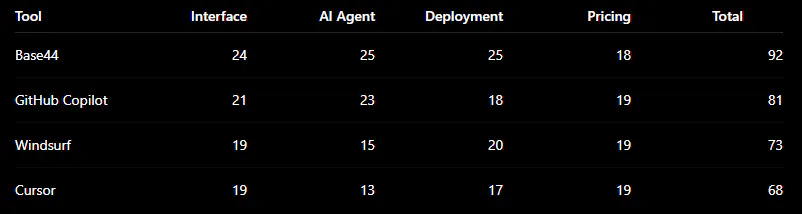
A few things worth noting beyond the numbers.
Cursor and Windsurf are genuinely useful if you already have a development background. They accelerate work. They do not replace the need for someone who understands architecture and deployment. If you are a developer who wants an AI-assisted workflow inside a familiar IDE environment, Cursor's VS Code integration and Windsurf's native Netlify deployment each have specific merits. A full Cursor AI vs GitHub Copilot vs Windsurf comparison for experienced developers would be a closer race than these scores suggest, because the deployment gap matters less when you already know how to configure hosting yourself.
GitHub Copilot is the best of the IDE-integrated tools. The accuracy under layered revisions separates it from Cursor and Windsurf in meaningful ways. For anyone asking about the best free AI coding assistant for beginners, it is worth noting that Copilot has a free tier (limited, but real), and the learning curve is minimal if you already use VS Code or JetBrains. It is also worth mentioning that Google Gemini Code Assist, Codeium, and Claude AI all operate in a similar category and are worth evaluating if you have specific language or IDE preferences. For Python work specifically, the best free AI for Python coding question often lands on Copilot or Codeium, depending on which IDE you live in.
Base44 wins on the use case that the other tools cannot fully serve: someone who has an app idea and zero coding background. The fact that it handles full-stack generation, authentication, database setup, and multi-platform deployment without any configuration is not a marketing claim. It was demonstrated in the same tests that broke the other platforms. For anyone asking about the best AI coding tool for building full-stack apps without writing code, this is where the answer currently lives.
For the best AI for code generation and debugging in a professional development context, Copilot is still the strongest choice. For everything else, Base44 closes the gap between idea and shipped product faster than anything else tested here.
One honest caveat: Base44's higher pricing tiers are a real barrier for some users. If you need the best AI for coding free with no credit card, tools like Codeium and Replit both offer free tiers worth considering. Bolt.new and Lovable.dev are also worth a look for no-code app building, though they did not match Base44's consistency on the complex revision tests. And if you are looking for the best AI code generator free no limits, you will hit caps on every serious platform at some point. Free plans work for exploration, not for shipping.
The tools that build fast but break on the hard prompt are not the best ai for code generation at scale. That distinction showed up clearly in testing.
Frequently Asked Questions
What is the best AI for coding 2026 if I am a complete beginner?
Base44 is the clearest answer for non-technical users who want to ship something real. It handles authentication, databases, and deployment automatically. GitHub Copilot is the better pick if you are a beginner who already knows some code and wants to get faster. Copilot's IDE integration means you are still learning while getting AI assistance, which is actually a better learning setup than having the AI do everything invisibly.
Is there a good free AI code generator with no major limits?
Honestly, no. Every platform in this comparison caps free usage in some way. Windsurf's 25 free credits burn in about three days of normal use. Codeium and Replit have free tiers that go further, but both hit walls on complex projects. The best AI code generator free options work for prototyping and learning. For anything you want to actually ship, a paid plan is realistically required.
How does Claude AI for coding compare to these tools?
Claude AI (Anthropic's model) is not a standalone coding environment, but it powers the underlying intelligence in several of these platforms. The output quality when using Claude Sonnet specifically shows up in Copilot's revision stability. If you want Claude AI for coding directly, Cursor supports Claude models natively, and you can use the API directly in any environment. But you are adding your own tooling around it rather than getting a packaged workflow.
Which tool handles gemini AI coding well?
Google Gemini Code Assist is a separate product aimed at enterprise teams and integrates into JetBrains and VS Code. It was not included in this specific comparison, but it belongs in any serious AI coding ranking for teams already inside Google Cloud. For individual developers, Copilot currently has more mature IDE integration and a stronger track record on complex tasks.
Is Base44 actually worth the price compared to the free tools?
For someone building a real product without a development team, yes. The comparison is not Base44 versus a free AI tool. It is Base44 versus hiring a developer or an agency. At $480 per year, you are getting authentication handling, database setup, web deployment, and iOS/Android publishing included. An agency charges that for a few hours of work. The free tools are fine for experiments. Base44 is for shipping.
Get CodeTips in your inbox
Free subscription for coding tutorials, best practices, and updates.
More from CodeTips

Claude Design AI Tool Review: What It Can and Can’t Do
Claude Design is Anthropic's new AI tool that turns Figma files into interactive prototypes and production-ready UIs no design software needed.

Canva AI Logo Generator Review (2026): Free, Fast, and Better Than Paying $30
AI logo generators are everywhere right now. Everyone claims they can create a “professional brand identity” in minutes. I believed that too, until I actually started using them for real projects.