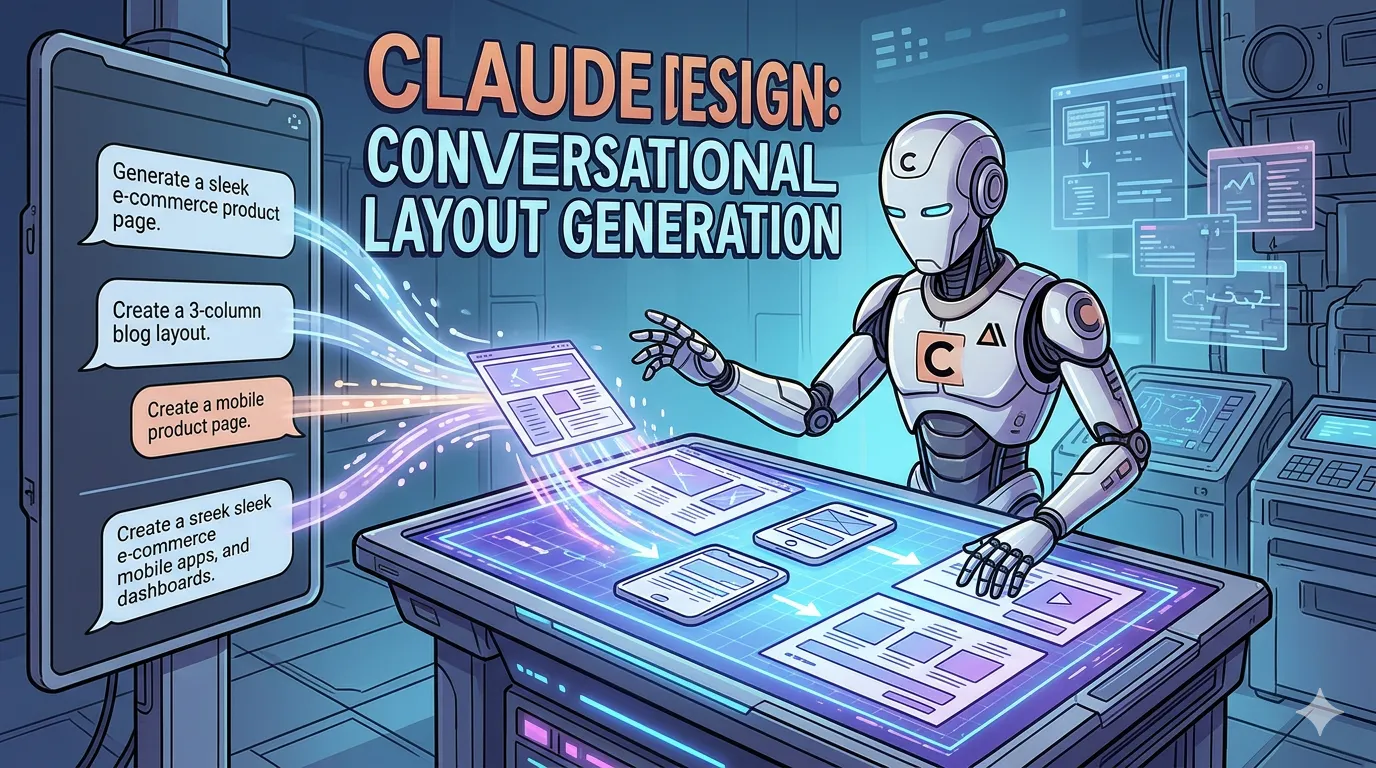
I generated a 14-slide investor deck, a landing page, and three logo variations in about 35 minutes last Tuesday. No designer. No Figma file. Just a chat window. That was my first real session with Claude Design, the visual generation feature Anthropic rolled into claude.ai, and it changed how I think about where the design tool stack is heading.
I want to be honest before I get into it: this is not a Figma killer. Not yet. But it solves a different problem so well that I haven't opened Figma for first drafts in two weeks.
What Claude Design Actually Is
The simplest answer to what is Claude Design by Anthropic: it's a generative skill inside the Claude product that turns conversational instructions into editable visual artifacts. Slides, landing pages, logos, social posts, simple web prototypes. You describe what you want, it produces a rendered output, and you iterate by talking to it or by clicking directly on elements to adjust them.
Under the hood it's the same model family that powers the rest of claude.ai (Claude Opus 4.7 at the high end), with a rendering layer on top that outputs to HTML/CSS, SVG, and slide structures. Anthropic Labs has been quietly shipping pieces of this for months, but the consolidated experience landed as a proper feature inside the chat interface.
If you're looking for how to access Claude Design: it shows up as a tool option in the composer on claude.ai, similar to how Artifacts or Code work. Pro and Team plans get the full feature set. The free tier gets a limited number of generations per day, so the answer to is Claude Design free to use is "kind of." You can try it. You can't live in it without paying.
How The Workflow Actually Feels
This is where it diverges hard from every other tool I've used.
In Figma, I start with a blank frame and build up. In Canva, I start with a template and edit down. In ChatGPT with GPT Images 2.0, I write a prompt, get an image, and either accept it or rewrite the whole prompt because the inpainting is still rough. Claude's approach is closer to working with a junior designer who reads minds reasonably well.
A real session from last week, copy-pasted from my history:
Me: Landing page for a B2B tool that helps finance teams reconcile Stripe payouts. Trustworthy, slightly playful. Hero, three feature blocks, testimonial, pricing, footer. Claude: [renders a full page] Me: The hero feels generic. Make the headline specific to the pain ("your CFO wants the September numbers by Friday"). Tighten the spacing on the feature grid. Claude: [renders v2] Me: Click on testimonial card → "make this two columns with a photo on the left"
That last bit is the part that surprised me. You can click on any element in the rendered preview and leave an instruction attached to it. The inline editing flow feels closer to leaving comments on a Google Doc than prompting an image model. It's the first conversational design surface I've used that doesn't make me feel like I'm fighting the model's defaults.
The iteration loop is fast. Ten to fifteen seconds per revision for most layouts. Slower for full slide decks, where you're regenerating multiple artboards.
Where It Works, Where It Doesn't
Two weeks of daily use, here's my honest split.
It's genuinely good at:
- Slide decks. I've made three this month and the quality is real, not "AI-generated" real. Consistent type hierarchy, sensible whitespace, coherent color logic across slides. If you're hunting for the best AI tool for creating slide decks for internal use, this is the one I'd start with.
- Landing pages and marketing sites. Output is responsive HTML you can export. The CSS is mostly clean, occasionally weird with custom properties, but readable.
- Quick logo and brand mark exploration. You won't ship the final identity from this, but you'll get to a defensible direction in twenty minutes that would take a designer half a day.
- Generating a starter brand kit (color tokens, type scale, spacing system) from a written brief. Useful as a jumping-off point, not as a finished system.
- Social graphics where consistency across a series matters more than craft.
It's mediocre or bad at:
- Anything requiring real photography composition. The image generation inside the layouts is fine for placeholders. It's not Midjourney.
- Complex information architecture. A four-screen mobile app flow with conditional states? You'll spend more time correcting it than building it yourself.
- Pixel-precise alignment. If you care about a 2px difference between cards, you'll be unhappy. Figma is still the answer there.
- Brand fidelity over time. Without a strict design system fed in, output drifts. The fifth slide doesn't quite match the first.
That last point matters. Anthropic added a feature for uploading a brand kit (logo, colors, type, voice notes) that the model references during generation. It helps. It's not bulletproof. If your team has tight brand standards, treat the output as a draft, not a deliverable.
Claude Design vs Figma, Honestly
People keep asking me about Claude Design vs Figma for landing pages and the framing is wrong. They're not the same category.
Figma is a design tool. You move pixels. You build systems. You collaborate with other people who also move pixels. The output is a source of truth that engineers translate into code.
Claude's offering is closer to a generation and prototyping environment that happens to produce visual artifacts. The output for web work is already code. There's no translation step. For a landing page where I'd otherwise mock up in Figma, hand off, and watch an engineer rebuild it in React, I can now skip two of those three steps.
Where they overlap:
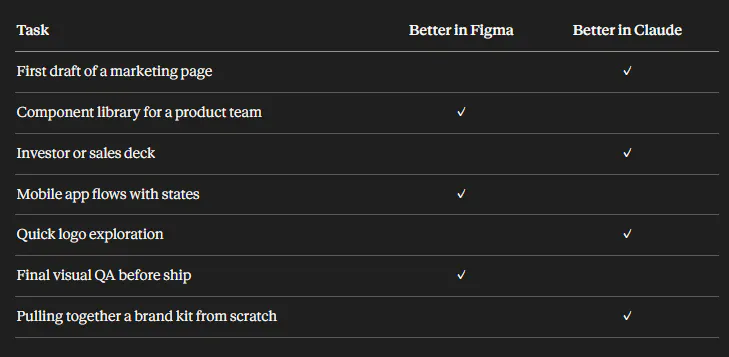
I still pay for Figma. I'll keep paying for Figma. But the percentage of work that starts in Figma has dropped sharply for me.
Canva sits in a different lane again, optimized for non-designers picking templates. The generation skill from Anthropic feels more like having a designer than picking from a library, which is why I find it more useful day-to-day even though Canva's template depth is much bigger.
Interactive Prototypes Are The Sleeper Feature
The thing nobody talks about enough: you can ask for working prototypes, not just static screens. Generating a clickable prototype with real state is where this gets interesting. Form validation. Modal flows. Tab switching. A pricing toggle that actually toggles.
I built a prototype for a friend's startup last week, a three-step onboarding flow with input validation, and the result was a working HTML page I could share with users for feedback. Not a clickable mockup pretending to be functional. Real code. Real interactions.
This is the part that makes me think Anthropic is playing a longer game than design tooling. If you can describe a flow and get working interactive code back, the gap between "design" and "build" gets thin for a lot of internal tools and marketing surfaces. That's a different category of automation for knowledge workers than what slide generators have offered before.
For a deeper look at the underlying capability, Anthropic's own documentation on Artifacts and skills is the clearest source on how the rendering layer is structured.
Version Management And Where It Falls Short
Every generation creates a new version in the conversation thread. You can branch. You can roll back. You can ask for a side-by-side. That's better than what I had in a single Figma file before component libraries got good.
But there's no shared workspace yet. If two people on a team are both iterating on the same deck, they're doing it in separate conversations and merging by hand. For solo work or a designer-of-one situation, this is fine. For a real team, it's the missing piece. I'd guess Anthropic ships multiplayer within the next two quarters, but I'm not on the inside.
Exports work for what you'd expect: PDF and PPTX for slides, HTML/CSS/JS bundles for web, PNG and SVG for graphics. The PPTX export is lossy, like every PPTX export ever made. If you need to hand the deck to someone who'll edit it in PowerPoint, expect to clean up.
A Practical Setup That's Working For Me
After two weeks, here's the workflow I've settled into:
- Brief written in plain text. Two or three paragraphs. Audience, goal, tone, anything brand-relevant.
- First generation. Don't edit, just look. Decide if the direction is right.
- Three to five revision rounds at the structural level. Layout, hierarchy, content. No nitpicking.
- Brand kit applied if I have one ready.
- Element-level tweaks via inline comments on specific blocks.
- Export. For web, drop the HTML into a real project and clean up by hand.
Total time for a landing page draft I'd actually show a client: about an hour. The same draft in my old workflow was half a day minimum.
I'm not claiming this replaces designers. It doesn't. What it replaces is the part of the design process that was always wasteful: the first three drafts where you and the designer are just trying to find the rough shape of the thing.
When I'd Skip It
If your work is brand identity at a senior level, skip it. The model has taste, but not the kind of taste a client is paying a senior designer for.
If you're shipping a product UI that lives for years and gets touched by ten engineers, skip it for production work. Use it for exploration, then build properly in your real stack.
If you can't articulate what you want in writing, skip it. Garbage prompts produce generic outputs. The conversational interface rewards people who can describe specifics, and punishes people who can't.
For everything else, especially the "I need a decent draft of this by tomorrow" work that fills most knowledge workers' weeks, this is now the first tool I open. Not because it's better than the specialists. Because the specialists were always overkill for 70% of what I was using them for, and I just didn't have an alternative until now.
I'll be curious to see how the team workspace and design system features mature. If those land well, the conversation about where Figma sits in the stack gets a lot more interesting.
Get CodeTips in your inbox
Free subscription for coding tutorials, best practices, and updates.
More from CodeTips
The Best AI Code Generator Won't Save You If You Use It Like This
Most developers are using AI to write code now. But there is a massive gap between engineers who strategically guide an AI Code Generator and "vibe coders" who just hit enter and hope for the best. One group ships features faster. The other ships bugs to production on a Friday afternoon.

Should You Learn to Code With AI? The Honest Truth
Should you learn to code with AI doing the heavy lifting? One old story proves why skipping the basics is a trap, and what it costs you when AI gets it wrong.

How to Run AI Models Locally: Complete Setup Guide
Learn how to run AI models locally on your own hardware, skip cloud subscriptions, and build a full local AI coding setup with LM Studio, Ollama, and VS Code.
The AI Productivity Myth: Why Most People Get It Wrong
AI productivity tools promise efficiency, but relying on the same workflows as everyone else leads to generic output. Here's how to use AI to amplify what makes you rare.

Prompt Driven Development: What Is SPDD?
Learn about prompt driven development and structured prompt-driven development (SPDD), how it transforms software engineering, and why it matters for AI.

GitHub Copilot Pricing Changes: What You Need to Know
GitHub Copilot pricing changes are here, and they're not pretty. Learn how the shift to usage-based billing affects your plan, credits, and overall value.
The Claude Code Source Code Leak: What We Learned From Anthropic’s Security Fiasco
The Claude Code source code leak exposed Anthropic’s AI secrets, hidden features, and development missteps. Here’s what the leak reveals about Claude Code and AI security.