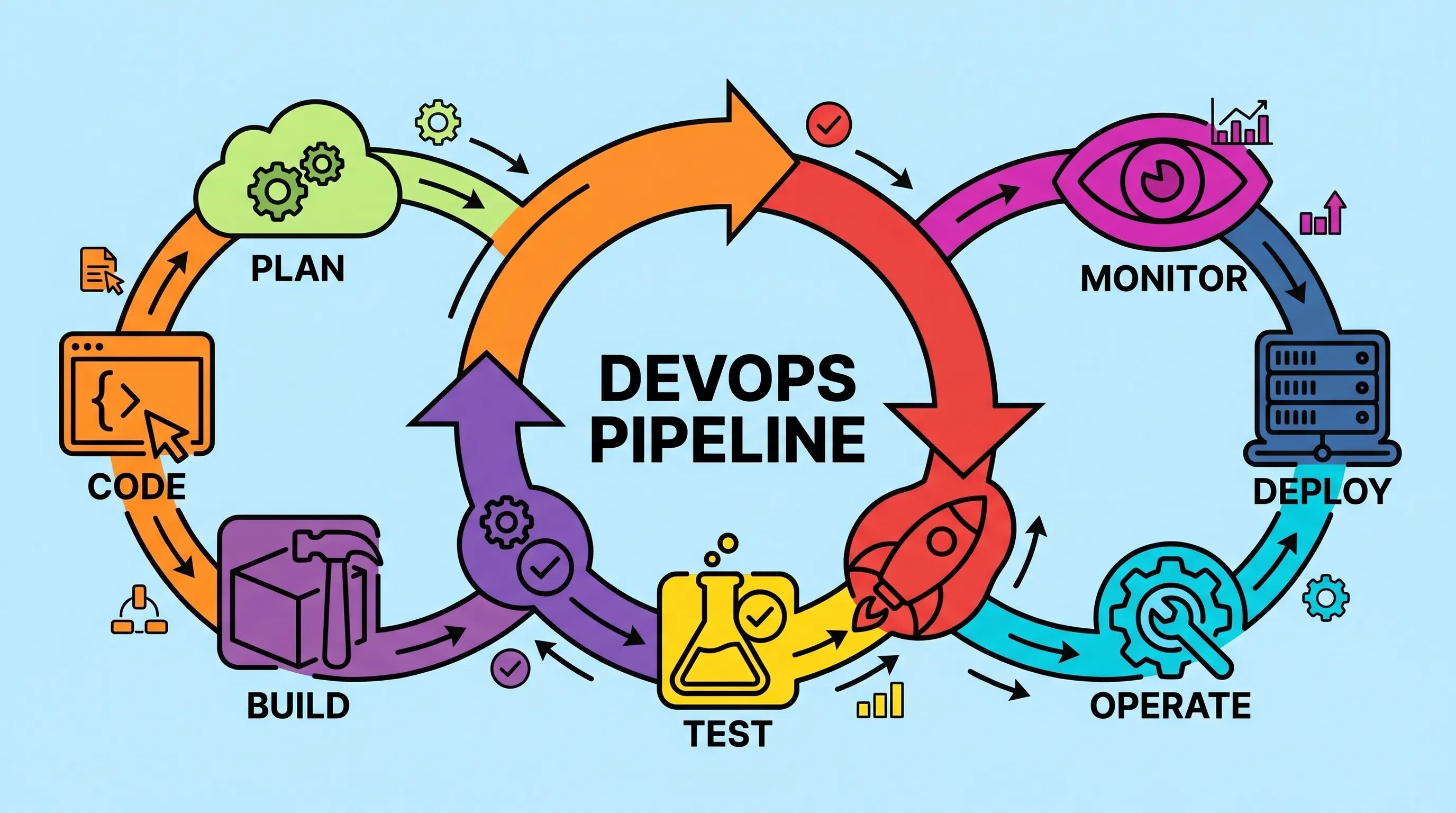
What Is a DevOps Pipeline? Stages, Tools, and How to Build One

Most teams don't fail at writing code. They fail at getting it to production reliably, quickly, and without someone staying late to babysit a deployment script. A well-constructed DevOps pipeline is the answer to that specific problem and once you've set one up properly, you'll wonder how you survived the manual version.
Table of Contents
- The Core Idea Behind Automated Delivery
- What a DevOps Pipeline Actually Looks Like
- From Code to Production: The Real Stages
- Choosing the Right Tools for Each Stage
- How to Build a DevOps Pipeline Step by Step
- Azure Pipelines and YAML-Based Workflows
- Frequently Asked Questions
The Core Idea Behind Automated Delivery
Before automation, the software delivery lifecycle looked like this: a developer finishes a feature, hands it off, a build engineer compiles it manually, someone spins up a test environment from a wiki page, a tester runs scripts by hand, and two weeks later — if nothing broke — the code might reach production. Every step was a human dependency. Every human dependency was a potential failure point.
The whole point of continuous integration and delivery is to break that dependency chain. You commit code, the system takes over, and the pipeline carries that commit through build, test, and deployment automatically. The goal isn't speed for its own sake. It's repeatability. A process that runs identically every time is far less error-prone than one that depends on who's on shift.
What drives the workflow is automation at each hand-off point. Instead of a build engineer, you have a build server. Instead of a manual test run, you have a test suite that fires on every commit. Instead of an ops engineer SSHing into a box, you have a deployment script triggered by a passing quality gate. The whole thing becomes a conveyor belt, not a relay race where someone might drop the baton.
The architecture behind this isn't complicated to understand in principle. What makes it hard is the integration — wiring the right tools together at each stage, setting up the triggers correctly, and making sure failures surface fast enough that the developer who caused them hasn't already moved on to something else. That last part is what continuous feedback is really about: shrinking the time between a broken commit and the developer knowing about it.
What a DevOps Pipeline Actually Looks Like
A CI/CD pipeline diagram typically shows a linear flow: source code → build → test → deploy → monitor. That's accurate but slightly misleading because it implies each stage waits neatly for the previous one. In practice there's parallelism, branching, and rollback paths everywhere.
Here's the conceptual shape of the thing:
- Developer pushes code to a version control system (Git, most likely).
- A commit triggers the CI server, which pulls the latest code from the repository and starts a build.
- The build artifact gets tested — unit tests first, then integration, then functional.
- If tests pass, the artifact moves through quality gates before being deployed to a staging or UAT environment.
- Further testing (security, performance, acceptance) runs against the deployed build.
- On a green result, the artifact is promoted to production.
Monitoring and feedback run the entire length of that chain. Every stage should be producing signals that flow back to the team. When something breaks at stage 3, the developer should know within minutes, not the next morning.
The important thing about that linear diagram is what it's replaced: a collection of manual handoffs, each with its own tribal knowledge and its own failure modes. When you visualize the pipeline this way, it's easy to spot where a team is still doing things by hand. Those gaps are where you focus first.
👉 Also read: CI/CD vs DevOps: What's the Difference and Which One Do You Need?

From Code to Production: The Real Stages
The DevOps pipeline stages from code to production break down into roughly five areas, though different teams name them differently.
Source and Integration
Everything starts with version control. The developer commits to a branch in Git or a similar system. The version control repository is the single source of truth — no code exists outside it, and nothing gets built from a local machine. That rule alone eliminates whole categories of "works on my machine" problems.
Continuous integration means every commit to the main branch (or a pull request targeting it) triggers an automated build. No exceptions. The moment you start allowing "quick fixes" to bypass the CI process, you've broken the contract the pipeline is built on.
Build
The build stage compiles source code into a deployable artifact. For a Java project, Maven handles this well — it manages dependencies, compiles the code, and packages it into a JAR or WAR. For other stacks, equivalents exist (npm, Gradle, Cargo, and so on). The build should be hermetic: given the same inputs, it produces the same output every time. If your build behaves differently depending on what's cached on the build server, that's a problem to fix before anything else.
Test
This is where most pipelines either earn their keep or become a bottleneck. The test stage should run unit tests (JUnit is the standard for Java), then integration tests, then broader functional tests. Selenium handles browser-based functional testing well. Cucumber and similar tools cover behavior-driven scenarios that map to actual acceptance criteria.
Quality gates are the checkpoints here. SonarQube, for example, lets you define rules — minimum code coverage, no critical security issues, no new bugs above a certain threshold — and block the pipeline if those rules aren't met. That's not bureaucracy; that's the pipeline doing its job.
Deploy
Deployment targets vary enormously: a VMware cluster, an AWS environment, a Rackspace setup, a Kubernetes cluster running containerized app deployments. The specific target matters less than whether the deployment is automated and idempotent. Running it twice should produce the same result as running it once.
Configuration management tools like Puppet and Chef handle environment setup — installing packages, managing config files, ensuring the target environment matches expectations before the artifact lands on it. Infrastructure as code extends this further: your environment definition lives in version control just like your application code, and it's provisioned automatically. No more "we set that up six months ago and nobody remembers how."
Monitor and Feedback
Continuous operations means the pipeline doesn't stop at deployment. Monitoring tools watch the running application and feed alerts back into the same communication channels the team uses. If a deployment causes a spike in error rates, someone should know before a user reports it.
Choosing the Right Tools for Each Stage
There's no universal stack. The right tools depend on your language, your team size, your cloud provider, and what you're already running. That said, some tools show up in most conversations for good reasons.
CI servers: Jenkins is the most widely deployed option and has a plugin ecosystem covering almost every tool you'd need to integrate. It's been around long enough that the documentation is comprehensive and most edge cases have a Stack Overflow answer. Bamboo is a reasonable alternative for teams already on the Atlassian stack. Travis CI works well for open-source projects hosted on GitHub. GitHub Actions has become the default for many teams starting fresh — it lives where your code lives, which removes one integration layer.
Build tools: Maven for Java projects is the standard. It handles dependency resolution and build lifecycle well enough that most teams don't need to think about it.
Code quality: SonarQube for static analysis and quality gates. You can self-host it or use SonarCloud if you'd rather not manage the infrastructure.
Testing: JUnit for unit tests, Selenium for browser automation, Cucumber for BDD-style acceptance tests. Most CI servers have plugins for all three.
Configuration management: Puppet and Chef both solve the same problem — consistent environment state across machines. The choice between them usually comes down to which one the ops team already knows.
Containers and cloud: Docker for containerization, Kubernetes for orchestration. AWS, GCP, and Azure are all viable deployment targets; your choice is mostly determined by where you're already spending money.
👉 Also read: The Best CI/CD Tools for DevOps Teams in 2026
For a more comprehensive breakdown of pipeline tooling options, the CNCF Cloud Native Landscape is a useful (if overwhelming) reference for the ecosystem.
How to Build a DevOps Pipeline Step by Step
Building a DevOps pipeline from scratch sounds intimidating. It's not, if you approach it incrementally rather than trying to automate everything at once.
Start with source control. If your team doesn't have a disciplined branching strategy and a rule that all code goes through the repository before it goes anywhere else, fix that first. Nothing else works without it.
Add a CI server. Get Jenkins or GitHub Actions running and configure it to trigger on every push to your main branch. At this point it doesn't need to do anything complex — just a successful trigger proves the integration works.
Automate the build. Wire your build tool (Maven, npm, whatever applies) into the CI server. Every triggered pipeline run should produce a build artifact. Failures should notify the committer immediately, not accumulate in an ignored email folder.
Add tests. Start with unit tests because they're fast and the feedback loop is tight. A JUnit suite that runs in 90 seconds is immediately useful. Integration and functional tests come later — they're slower, and running them on every commit becomes impractical beyond a certain scale without parallelization.
Add quality gates. Connect SonarQube or a similar tool and define the rules your team agrees on. Start conservative — it's easier to loosen rules later than to add them after people have gotten used to ignoring them.
Automate deployment to a non-production environment. Get a staging environment that's provisioned automatically (using Puppet, Chef, or infrastructure-as-code tooling like Terraform) and deploy every passing build there. Once this works reliably, add the acceptance and security testing that runs against it.
Automate production deployment. This is the last step, and it's the one most teams are nervous about. The nervousness usually signals that the earlier stages aren't trusted yet. If your test coverage is solid and your staging environment reliably catches issues, automated production deployment is just the logical extension of everything you've already built.
The key word across all of this is incremental. A team that goes from zero to full pipeline automation in one sprint usually ends up with something fragile. A team that adds one stage per iteration ends up with something they actually understand and trust.
Azure Pipelines and YAML-Based Workflows
The Azure CI/CD pipeline offering from Microsoft is worth understanding separately because it makes some choices that differ from Jenkins-style setups. In Azure Pipelines, your pipeline definition lives in a YAML file committed to your repository alongside your code. That's a meaningful shift from clicking through a UI to configure jobs.
A minimal Azure Pipeline YAML file looks like this:
trigger:
  - main

pool:
  vmImage: 'ubuntu-latest'

steps:
  - task: Maven@3
    inputs:
      mavenPomFile: 'pom.xml'
      goals: 'clean package'
      publishJUnitResults: true
      testResultsFiles: '**/TEST-*.xml'
  - task: SonarQubePrepare@5
    inputs:
      SonarQube: 'SonarQubeConnection'
      scannerMode: 'Auto'
      projectKey: 'my-project'
The trigger block defines which branches kick off the pipeline. pool sets the agent environment. Each step maps to a task — either a built-in task like Maven@3 or a custom script. Agents can be Microsoft-hosted (no infrastructure to manage) or self-hosted (you control the machine).
The YAML-as-code approach means your pipeline definition goes through the same review process as your application code. You can see the history of pipeline changes, revert a bad pipeline update, and branch your pipeline definition alongside feature branches. For teams already comfortable with Git workflows, this model fits naturally.
Azure Pipelines also integrates with GitHub repositories natively, so if you're not in the Azure DevOps ecosystem but want to use it for pipelines, you can connect your GitHub repo without migrating anything.
The trade-off is that Azure Pipeline YAML has its own syntax quirks and a learning curve that's steeper than GitHub Actions for developers who already live in the GitHub UI. For a devops pipeline tutorial for beginners, GitHub Actions is probably the gentler on-ramp; Azure Pipelines is the better choice when you need deeper integration with Azure services or need enterprise-grade access controls.
Frequently Asked Questions
What is a DevOps pipeline and how does it work?
A DevOps pipeline is the automated chain of tools and processes that carries code from a developer's commit through build, test, and deployment stages until it reaches production. It works by using triggers: a push to a repository starts the build server, the build server runs tests, and passing tests trigger deployment. Each stage produces feedback that flows back to the team. The key word is "automated" — a pipeline that requires a human to kick off each stage is really just a checklist.
Which CI server should a beginner start with?
Honestly, GitHub Actions if your code is on GitHub. It's the lowest-friction starting point — you create a .github/workflows directory, add a YAML file, and you have a working pipeline within an hour. Jenkins gives you more control and more plugin options, but setting it up from scratch takes longer and involves more infrastructure decisions upfront. Start with what gets you running fastest; you can always migrate later.
Do I need infrastructure as code to have a working pipeline?
No, but you'll probably want it within six months of going without it. The moment you have to recreate a staging environment from memory, you'll wish it was in version control. Tools like Terraform work well alongside configuration management tools like Puppet and Chef. You don't have to implement everything at once — automate the environment setup for your staging environment first, then work backward or forward from there.
What's the difference between continuous delivery and continuous deployment?
Continuous delivery means every passing build is ready to go to production and can be deployed with one click or one command. Continuous deployment goes one step further: passing builds are deployed to production automatically, without any human approval step. Most regulated industries (finance, healthcare) stop at continuous delivery because they need a manual sign-off gate before production. Most software-as-a-service teams aim for continuous deployment because it keeps release batches small and rollbacks trivial.
How long does building a pipeline from scratch actually take?
A basic CI pipeline that builds and runs unit tests on every commit can be functional in a day for a small project. A full pipeline with automated deployment, quality gates, security scanning, and environment automation takes weeks — but you don't build it all at once. Most teams get roughly 80% of the value from the first few stages (automated build and unit tests). The rest is worth building, but the returns diminish as you go further.
Get CodeTips in your inbox
Free subscription for coding tutorials, best practices, and updates.
More from CodeTips

What Are DevOps Engineers, Really? Roles, Skills, and How to Become One
Software teams have been fighting the same war for decades: developers ship code, operations breaks it, developers fix it, operations tests it again. That cycle used to take weeks. DevOps exists because that pace became commercially unacceptable Netflix calculated that a single hour of downtime cost them roughly $200,000.

The Complete DevOps Roadmap: Go from Zero to Engineer in 10 Months
Ten to fourteen months. That's the honest timeline if you study three to five hours a day, don't skip Linux, and resist the urge to jump straight to Kubernetes because it sounds cool on LinkedIn. This DevOps Roadmap is the exact order I'd learn things in if I had to do it again, with real time budgets for each stage and the tools I'd actually install instead of the ones that just look good in a job description.

The DevOps Definition Nobody Actually Explained to You (Until Now)
DevOps gets defined a dozen different ways depending on who's explaining it a culture, a toolchain, a job title. Here's the version that actually held up once I started shipping to production on my own.
The Best CI Server Tools: Honest Picks for Every Dev Team
Picking the wrong CI Server Tools early in a project costs more than people expect — not just in migration time, but in the slow friction of a pipeline that fights your team instead of helping it. I have watched teams rebuild their entire automation setup six months in because they chose something that felt familiar rather than something that fit. This guide is built around what actually matters when you are comparing options: realistic trade-offs, honest limitations, and which tool fits which situation.

CI/CD vs DevOps: What's the Real Difference (And Why It Matters)
Most developers use CI/CD and DevOps interchangeably. They shouldn't. One is a philosophy, the other is a specific, automatable workflow inside that philosophy. Getting that distinction right changes how you build teams, choose tools, and debug failed deployments.
The 12 Best CI CD Tools for DevOps Teams (And How to Pick the Right One)
Most teams ship broken software not because they lack talent, but because they lack the right toolchain. The CI CD tools for DevOps covered here are the ones that have earned their place in real production environments, not just conference talks. This is not a random list of software. It is the actual stack that connects your version control system to running containers in production, with security, observability, and configuration management wired in between.